
Five steps, running every day
TrustNiq replaces the annual spreadsheet with a loop: collect evidence from your systems, test it against DPDP and CERT-In obligations and every other framework you activate, fix what fails, and keep the proof. Governance and audits sit on the same evidence.
- Connect
Read-only connections
Add your cloud accounts, identity directories, code hosts and databases. Credentials are referenced from your secret store or encrypted at rest, and scans run on a schedule you choose.
- AWS, Azure, Entra ID, Okta, Google Workspace, GitHub
- PostgreSQL, MySQL and other relational databases
- Vulnerability reports from Trivy, OpenVAS and Dependency-Track
- Consent events and rights requests through scoped API keys
- Policies from Google Drive, SharePoint and Confluence
- Discover
Inventory and personal data map
Every scan updates an inventory of systems, identities, datasets and data flows. Columns and files are classified for personal data, with Indian identifiers such as Aadhaar and PAN treated as high risk.
- Unregistered systems flagged as shadow assets
- Records of processing linked to purposes and vendors
- Lineage from system to dataset to purpose to vendor and country
- Human review for uncertain classifications
- Test
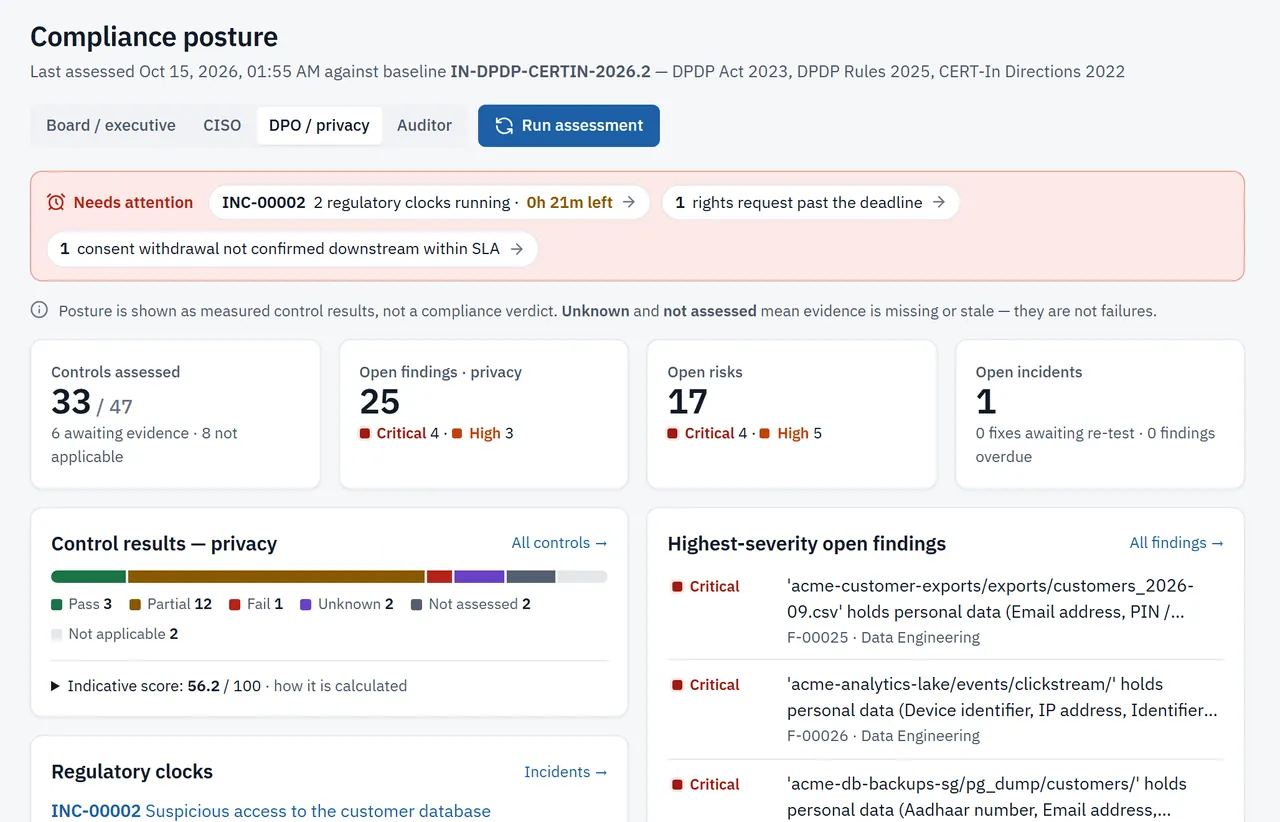
Controls tested on evidence
A library of controls, each mapped to the DPDP Act, the DPDP Rules, the CERT-In Directions and the other frameworks you activate, is tested against the evidence collected. Every result records the rule it applied and the evidence it used.
- Pass, partial, fail, unknown or not applicable, with the reason
- Manual controls use attestations with maker-checker approval
- Applicability from your organisation profile, for example Significant Data Fiduciary duties
- Posture over time, by domain and by obligation
- Your own custom controls, labelled attested rather than tested
- Fix
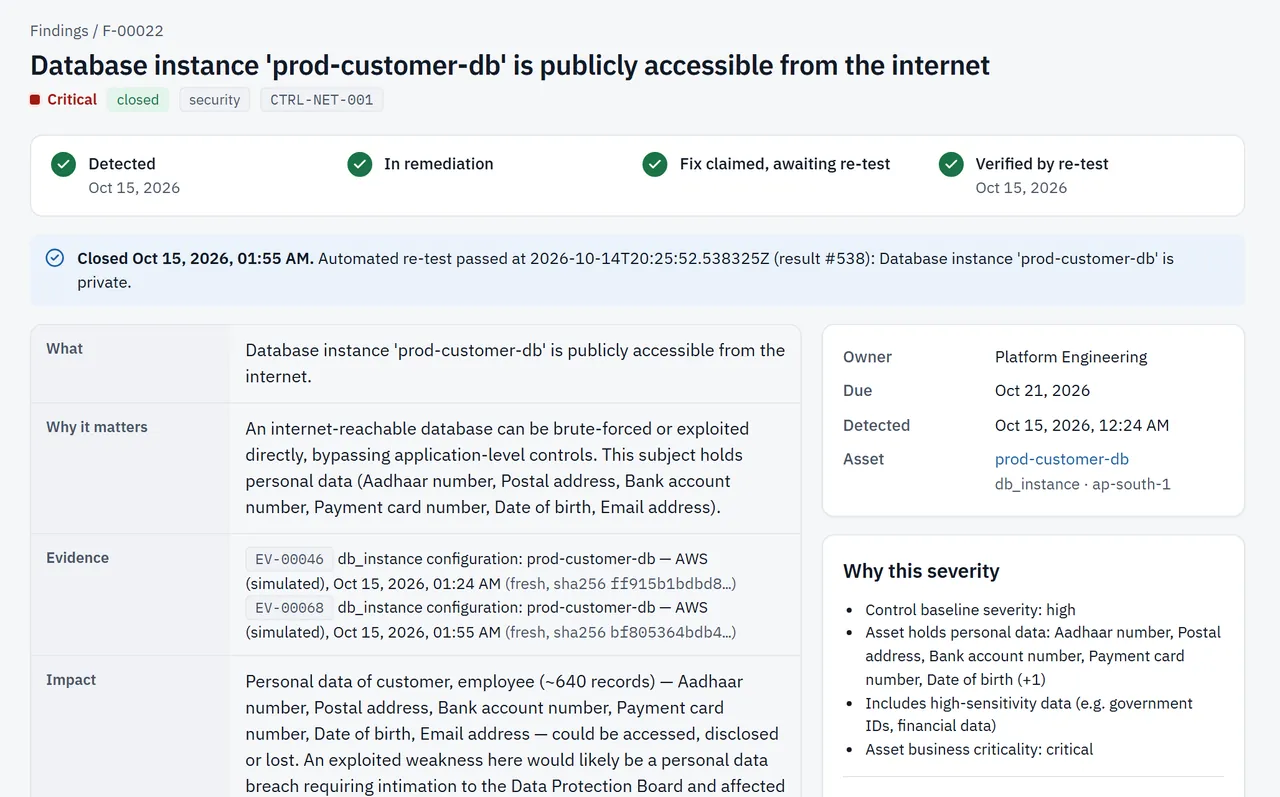
Findings that close on proof
Failures become findings with severity, owner team and due date. They go to Jira, ServiceNow, Slack, e-mail or a webhook, and close only when a re-test passes.
- Risk-based due dates and escalation
- Exceptions need an approver, reason and expiry
- Vulnerabilities ranked by business context: exposure, personal data and known exploitation
- Reopened automatically if the problem returns
- Prove
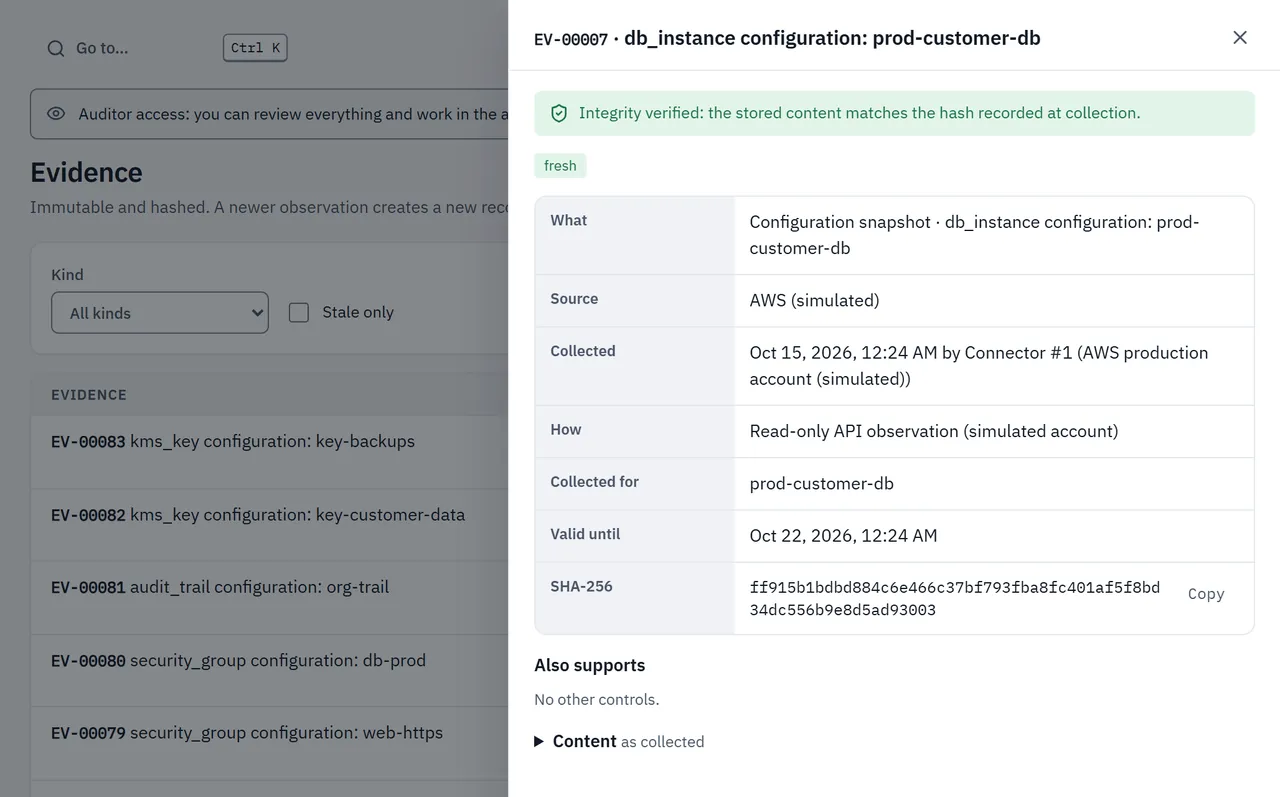
Evidence your auditors accept
Evidence is hashed when collected and every action is written to a hash-chained audit trail. Reports come from the same data, so they always agree with what the platform shows.
- Board pack PDF and audit evidence package (ZIP with manifest)
- CERT-In and DPDP breach report drafts
- ISO 27001, SOC 2, NIST CSF 2.0, GDPR and PCI DSS crosswalks from the same evidence
- Security questionnaire answers grounded in control results


Privacy, governance and audits on the same evidence
Privacy operations and governance
The day-to-day work of a privacy office sits next to the evidence it depends on.
- Consent ledger with withdrawal propagation to processors
- Data Principal requests with the 90-day clock and verified erasure
- DPIAs, notices and purpose-drift checks
- AI system inventory and shadow AI detection
Frameworks, policies and risks
The compliance programme is run from the same results, so status in a framework report always matches the evidence.
- Framework library with a setup wizard that recommends what to activate
- Gap analysis and owned gap tasks
- Statement of Applicability with approved exclusions, issued as a frozen version
- Versioned policies with approval and acknowledgement, and a risk register
Engagements on frozen evidence
Internal and external auditors work inside TrustNiq on a snapshot that later changes cannot rewrite.
- Scope frozen and hashed when fieldwork starts
- Evidence requests with owners and due dates
- Reproducible samples that can be re-drawn and compared
- Observations, management responses and auditor sign-off
Unknown is never a pass
Many tools turn missing data into a green tick. TrustNiq does the opposite: if a connector has not run, evidence has expired or a document has not been reviewed, the control is unknown and the gap is shown.
What an AI assistant may and may not do
Where AI helps, for example answering a question about your posture or giving a second reading of a vendor contract, its references are checked against the source and a person confirms anything before it counts as evidence. AI never decides a status. Providers are opt-in per organisation and per purpose, and you can limit yourself to local models.
Questions
What access does TrustNiq need?
Read-only access. Cloud and directory connectors use read-only roles or API scopes, and database scans read schema and a small sample of values to classify columns. TrustNiq does not change your systems.
Where are sampled values kept?
Sampled values are examined in memory and never stored. Classification keeps the category, a confidence score, the reasoning and masked shapes such as aaaa@aaaa.aaa. Evidence items keep configuration and metadata, hashed when collected.
What happens when evidence is missing?
The control shows as unknown or not assessed, never as passed. The result says which evidence is missing, so the gap is visible to the Board and auditors.
Which connectors are available?
AWS, Microsoft Azure, Entra ID, Okta, Google Workspace, GitHub and relational databases, plus imports from Trivy, OpenVAS and Dependency-Track. Policies and procedures can be pulled read-only from Google Drive, OneDrive or SharePoint and Confluence. Connectors are in early access: we validate each one against your environment during onboarding.
How do other frameworks fit into the loop?
Each control is mapped to every requirement it supports, across the DPDP Act, DPDP Rules, CERT-In, ISO 27001, SOC 2, NIST CSF 2.0, GDPR and PCI DSS. When a control is tested, the result counts towards every active framework. Requirements no control covers show as gaps you can assign, or exclude with an approved justification in the Statement of Applicability.
See your compliance posture on your own systems
DPDP, CERT-In, ISO 27001, SOC 2 and more. Connect one cloud account and one identity directory in a 14-day trial. No card needed.